Wedding Budget Spreadsheet: Split, Track and Stay Under Your Total
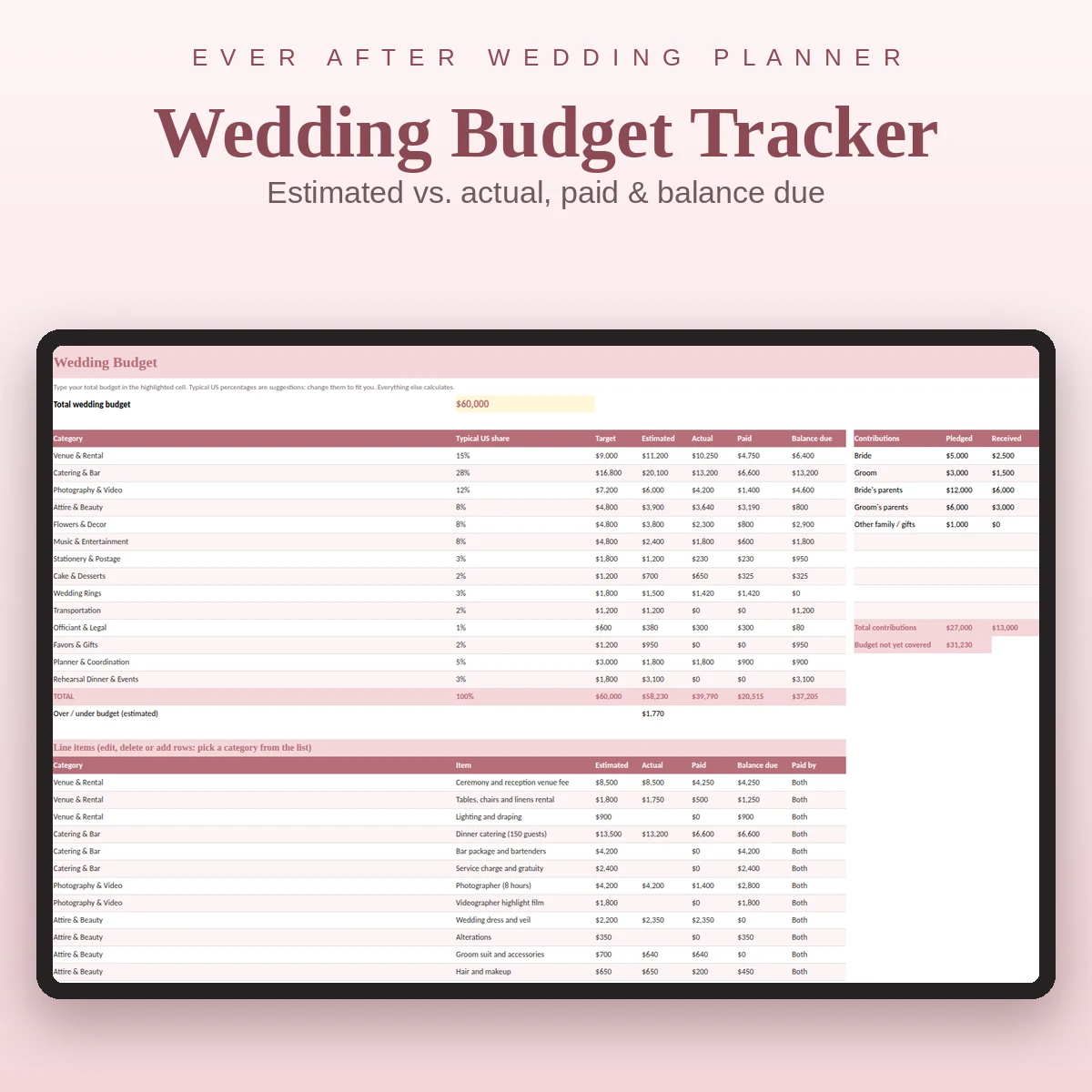
A wedding budget spreadsheet should do three jobs: divide your total sensibly, record what you actually commit to and show you what is left. If it does only the first, you have a plan. If it does all three, you have control.
Below is the full method, with the formulas, the percentage split most couples start from, a monthly payments view and a few rules for staying calm when a quote comes in higher than expected.
Step 1: Start with one number
Before opening any template, agree your total with your partner and with anyone contributing. This number is not a prediction, it is a ceiling. Write it in one cell and let everything else calculate from it.
If family is helping, add a small table: who is contributing, how much they pledged and how much they have already given. The gap between your estimated total and the money that is covered is the number you really need to watch.
Step 2: Split it by category with percentages
Percentages turn a scary total into manageable pieces. They are a starting point, not a verdict. A typical US split looks like this:
| Category | Typical share |
|---|---|
| Catering and bar | 28% |
| Venue and rental | 15% |
| Photography and video | 12% |
| Attire and beauty | 8% |
| Flowers and decor | 8% |
| Music and entertainment | 8% |
| Planner and coordination | 5% |
| Stationery and postage | 3% |
| Rehearsal dinner and events | 3% |
| Wedding rings | 3% |
| Cake and desserts | 2% |
| Transportation | 2% |
| Favors and gifts | 2% |
| Officiant and legal | 1% |
The formula in the Target column is simply total × share. Change the total and every target updates.
Your priorities change the split. A couple who care most about food and music might take from flowers and stationery. A couple marrying at a free-standing venue with no rental needs may lower the venue share. The spreadsheet makes the trade-off visible, which is the point.
Step 3: Add line items and sum them with SUMIF
Under the summary, keep a list of every cost with the columns Category, Item, Estimated, Actual, Paid and Balance due. In the summary, each category pulls its totals with:
=SUMIF(category column, this category, amount column)
This means you can add, delete or reorder line items without editing the summary. It also means one mistake in a category name, such as "Flower" instead of "Flowers", will drop a cost out of the total. Use a drop-down for categories to avoid this.
The Balance due is Actual − Paid, or Estimated − Paid while there is no actual yet. Totals at the bottom give you the figures to compare with the ceiling.
Step 4: Show the gap
Two cells deserve their own spot at the top:
- Over or under budget = total budget − estimated total.
- Budget not covered = estimated total − contributions.
Color the first one when it turns negative. You will notice it before the bank does.
Step 5: Add a payments schedule
Most wedding money moves in installments: a deposit now, a second payment in a few months, a final balance a week or two before the date. A payments list with Vendor, Description, Amount, Due date, Status, Date paid and Method does two things for you:
- A due-date counter (due date − today) and a flag for "Overdue", "Due this week" or "Upcoming".
- A total of paid and still to pay, which should match the budget sheet.
Sort by due date once a month. You will see which months are heavy and can save toward them, instead of discovering that the venue balance and the catering balance land in the same week.
Step 6: Keep a buffer and a "later" list
Add a buffer line of a few percent that you do not allocate. Then add a short "later" list of small items you know are coming but have no quote for yet: alterations, a hair trial, postage, emergency kit, tips. Giving them a row, even with a rough number, is better than hoping.
Rules for staying under the total
- Decide your trade-off rule before you need it. "If one category goes over, we reduce the guest list or the flowers, not the photographer."
- Compare quotes on the same basis. Ask what is included: service fees, taxes, rentals, setup, travel.
- Enter the real price the day you sign. Delete nothing, replace the estimate and note why it changed.
- Review the sheet weekly. Ten minutes. The earlier you see a variance, the more options you have.
- Show family the summary, not the whole file. A printed one-page budget is easier to discuss than 100 rows.
Budget breakdown by amount
Many people search for a breakdown at a specific total. The method is the same at every size: multiply the total by the shares in the table, then adjust. At a smaller total, the fixed costs (venue, catering minimums) take a larger share, so expect to give up some categories entirely or handle them yourselves. At a larger total, the extra money usually flows to catering, entertainment and decor.
A ready-made wedding budget spreadsheet
Ever After Planner already has this built. The Budget tab holds the 14 category targets, the contributions table, the line items with estimated, actual, paid and balance due, and the over or under budget line. The Payments tab holds each installment with due date, status, method and a counter for days until due. The Dashboard shows total budget, estimated, actual, paid so far and remaining to pay, along with checklist progress and RSVPs.
It opens in Excel, Google Sheets and Numbers, and it ships with realistic sample rows so you can see the formulas working before you type your own figures. Pair it with the vendor tracker so deposits entered once appear everywhere they should, and see the wedding budget template guide for the column-by-column logic.
This guide is general planning information, not financial advice.